The Comprehensive Guide to Temporary Email for Freelancers : Privacy, Security & Best Practices
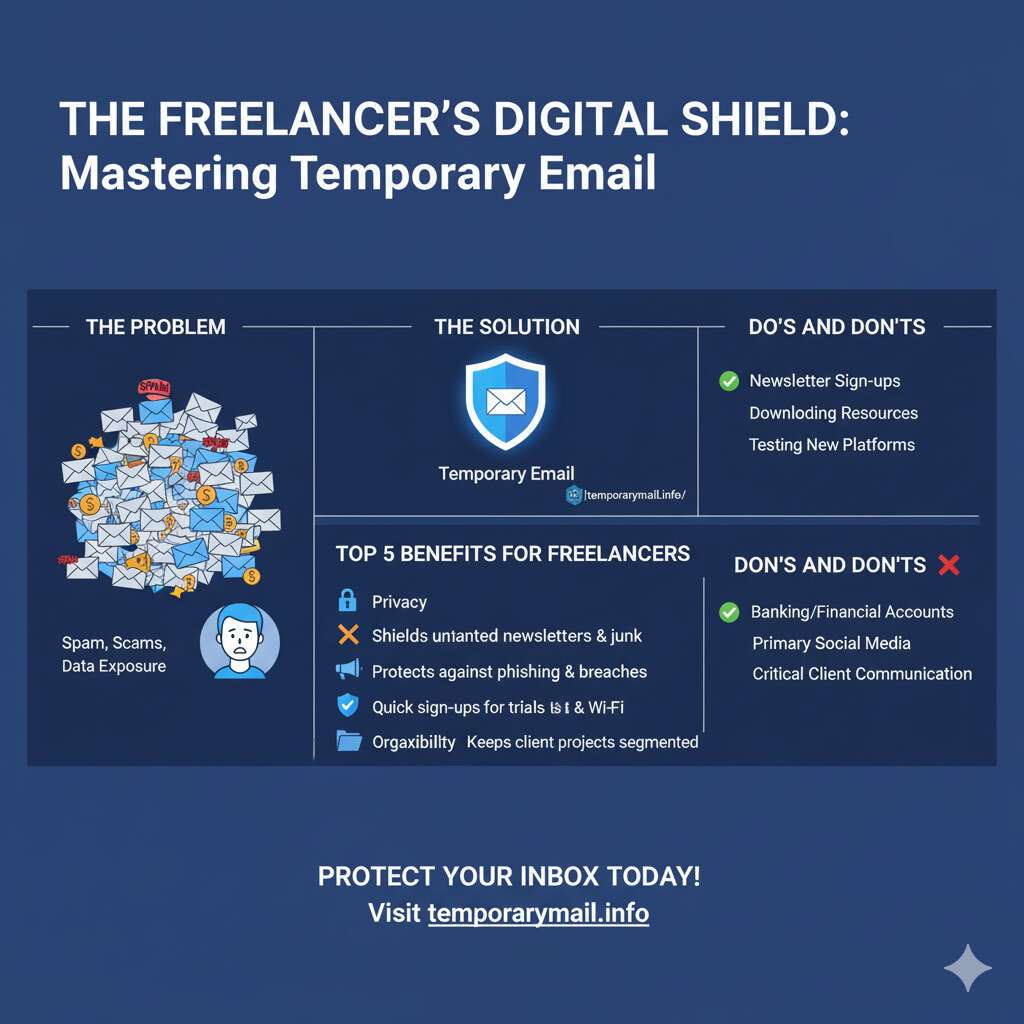
The Comprehensive Guide to Temporary Email for Freelancers : Privacy, Security & Best Practices
The Modern Freelancer's Privacy Paradox
In the contemporary digital economy, freelancers operate within a fundamental conflict: the necessity for broad online visibility to secure clients is directly at odds with the escalating risks to their digital security. Lacking the protective infrastructure of a corporate IT department, a freelancer's digital identity is simultaneously their greatest asset and their most significant vulnerability. This "Freelancer's Privacy Paradox" places them in a precarious position where the very actions required for business growth—engaging on platforms, signing up for new tools, and maintaining open lines of communication—exponentially increase their exposure to cyber threats.
A freelancer's primary email address serves as their digital passport, used for nearly every professional and personal transaction online.
Demystifying Disposable Email: A Freelancer's First Line of Digital Defense
What is a Temporary Email Address?

A temporary email address—also known as a disposable, throwaway, or burner email—is a self-destructing email account with a predetermined, often short, lifespan.
How the Technology Works: An In-Depth Technical Look
To build trust and enable informed usage, it is essential to understand the technical architecture that powers temporary email services. These providers are not merely generating random text strings; they are operating functional, albeit simplified, email systems. The process begins with the service provider registering multiple domain names they control.
For each of these domains, they configure Mail Exchange (MX) records within the Domain Name System (DNS). These MX records are crucial as they direct the global email system to send any mail addressed to that domain to the provider's specific mail servers.
- The sender's mail server performs a DNS lookup for the MX record of the provider's domain.
- The MX record points to the temporary email provider's server.
- The sender's server establishes a connection with the provider's server using the Simple Mail Transfer Protocol (SMTP).
- The provider's server accepts the incoming email and stores it temporarily.
- The email is then displayed to the user through a simple web interface on the provider's website.
After a set period, the service automatically purges the email and, in many cases, the address itself, ensuring no long-term record is kept.
The Critical Distinction: Temporary Email vs. Email Alias
A common point of confusion that can lead to significant security risks is the failure to distinguish between a temporary email and an email alias.
Temporary Email (The Disposability Model): This is a defensive tactic designed to absorb spam from a one-time, low-trust interaction. These addresses have a fixed, short lifespan and are meant to be abandoned.
Email Alias (The Segmentation Model): This is a proactive strategy for managing one's digital identity. An alias is a secondary email address that forwards all incoming mail to your primary, private inbox.
Strategic Use Cases: How Top Freelancers Leverage Temporary Emails
Moving from theory to application, temporary emails provide freelancers with a versatile tool for managing professional risk. Their strategic value lies in their ability to act as a buffer, enabling engagement with unknown entities without extending premature trust. Check out our guide on
Shielding Your Primary Inbox: The Everyday Defense
The most common application of temporary emails is as a shield against the deluge of spam and marketing communications.
Freelancers can use a disposable address when signing up for professional forums, discussion groups, or public Wi-Fi networks.
Securely Accessing Tools and Free Trials
The gig economy requires freelancers to constantly evaluate new software and SaaS platforms. Temporary emails are an ideal tool for testing these services without commitment.
Navigating Freelance Platforms and Client Communications
Using temporary emails on freelance platforms like Upwork and Fiverr requires a nuanced understanding of their terms of service. Sharing contact information before a contract is initiated is strictly prohibited.
Aiding in Development and Quality Assurance
For freelancers in web development and quality assurance (QA), disposable emails are an indispensable part of their toolkit. They allow for the rapid creation of numerous dummy accounts to comprehensively test application features like user registration flows and password reset functionality.
A Comparative Analysis of Top Temporary Email Providers.
Selecting the right temporary email service depends entirely on the freelancer's specific needs. The ideal choice varies based on whether the priority is speed, security, or anonymity. For a complete overview, check out our list of the
Criteria for Selection
A robust evaluation of temporary and alias email providers should be based on a consistent set of criteria:
- Security and Privacy: This includes encryption standards, data retention policies, and whether inboxes are public or private.
- Ease of Use: The best services offer instant, one-click address generation with no registration.
- Lifespan and Control: This refers to the expiration time of an address and any options to extend its life or manually delete it.
- Advanced Features: For sophisticated use cases, features like sending emails, receiving attachments, or API access are critical.
- Business Model: Understanding if a service is free and ad-supported or a paid premium service helps set expectations.
Feature-by-Feature Comparison of Leading Services
(Note: For an interactive version of this table with sortable features, please visit our full comparison page.)
To facilitate a direct comparison, the following table summarizes the key attributes of leading providers, tailored to the needs of freelancers.
| Provider | Best For | Security Model | Key Freelancer Features | Lifespan | Pricing |
|---|---|---|---|---|---|
| temporarymail.info | Overall Reliability & Privacy | Anonymous, Secure, No Logs | Instant generation, high uptime, user-controlled deletion | User-controlled | Free |
| Temp Mail | Quick, anonymous sign-ups | Anonymous, basic security | Mobile apps, QR access | 10 mins to 1 hr
| Free; Premium
|
| Guerrilla Mail | Sending anonymous emails | Scrambled addresses, public inbox | Send/receive, 150MB attachments | 1 hour (auto-deleted)
| Free
|
| StartMail | Long-term identity segmentation | PGP encryption, zero tracking | Unlimited aliases, custom domains | Permanent (user-controlled) | Paid
|
| SimpleLogin | Advanced alias management | Open-source, PGP support, 2FA | Unlimited aliases, browser extensions | Permanent (user-controlled) | Freemium
|
| Proton | Maximum security communication | End-to-end encryption | Secure core email, limited aliases | Permanent (user-controlled) | Freemium
|
When Should You Absolutely Avoid Using a Temporary Email?
While disposable emails are a powerful privacy tool, their misuse can lead to catastrophic consequences. The core vulnerability of a temporary email is that it is, by design, an identity-less tool. This feature, which provides anonymity, also makes identity verification—the cornerstone of account recovery—impossible.
High-Stakes Registrations
Under no circumstances should a temporary email address be used for any service that involves financial transactions or sensitive personal data. This includes online banking, payment platforms, and any government-related services.
Sensitive Client Data and Contracts
Professionalism and security dictate that temporary emails must never be used for official client communication. Sending or receiving contracts, invoices, or any sensitive client data through an insecure, disposable service is a major security risk and severely damages a freelancer's credibility.
The Hidden Dangers: Security, Privacy, and Access
Beyond specific use cases, there are inherent risks associated with the technology itself:
- Permanent Account Loss: This is the single greatest risk. If a password is forgotten for any service registered with a temporary email, recovery is impossible.
- Security and Privacy Illusions: Anonymity is often overstated. Many free services log user IP addresses.
- Service Blockades: A growing number of websites actively identify and block registrations from domains associated with known temporary email providers.
- Reputational Damage: From the perspective of a service provider or a potential client, the use of a disposable email can be perceived as suspicious activity.
Call to Action: Understanding these risks is the first step. For a secure alternative for your important sign-ups, consider creating a dedicated alias.
Beyond Burner Emails: Architecting a Resilient Cybersecurity Strategy
Effective cybersecurity for a freelancer is not about finding a single perfect tool, but about constructing a multi-layered defense strategy. A temporary email protects your identity at the perimeter, but this is only one piece of a comprehensive security posture. These are some essential digital security tips for freelancers.
The Freelancer's Security Stack
A resilient cybersecurity framework for a freelancer should include these essential tools:
- Virtual Private Networks (VPNs): A VPN is non-negotiable for any freelancer who works on public Wi-Fi. It encrypts all internet traffic, making it unreadable to anyone who might intercept it.
- Password Managers: The first line of defense for any account is a strong, unique password. A password manager generates and securely stores complex passwords for every online service.
- Multi-Factor Authentication (MFA): MFA adds a critical second layer of security by requiring a second form of verification in addition to a password.
Protecting Your Livelihood: Data Management Best Practices
Beyond tools, disciplined data management practices are essential to avoid email hacking and protect data:
- Data Encryption: Sensitive data should be protected not only in transit but also at rest. This involves encrypting the hard drive of work devices and using encrypted folders for sensitive client files.
- Secure File Transfers: When sharing files with clients, use dedicated secure file transfer services that offer end-to-end encryption.
- Routine Backups: Data loss can occur from hardware failure, theft, or a ransomware attack. Implementing a robust backup strategy ensures that business-critical information can be recovered quickly.
Frequently Asked Questions (FAQ)
What is the best temporary email for freelancers?
The best temporary email depends on your needs. For overall reliability, privacy, and ease of use,
Is using a temporary email completely safe?
A temporary email is safe for its intended purpose: protecting your primary email from spam and maintaining anonymity in low-risk interactions. However, it is not safe for sensitive accounts (banking, financial) because most services lack passwords and can be public.
How do I protect my main email from being hacked?
Protecting your main email involves a multi-layered strategy. Use strong, unique passwords (managed by a password manager), enable multi-factor authentication (MFA), use a VPN on public Wi-Fi, and be wary of phishing attempts.
What is the difference between a temporary email and an email alias?
A temporary email is for one-time use and is designed to be thrown away. It has a short lifespan, is often public, and cannot be used to reply.
Conclusion: Empowering Your Freelance Career with Intelligent Digital Privacy
In the digital landscape of the gig economy, temporary and alias emails have evolved from a niche trick for avoiding spam into an essential tool for strategic risk management. For the modern freelancer, navigating the paradox of visibility and vulnerability requires a deliberate and intelligent approach to digital privacy. By understanding the fundamental distinction between disposable addresses for anonymous, transient interactions and email aliases for controlled, long-term identity segmentation, freelancers can reclaim control over their digital footprint.
However, these tools are not a panacea. Their power is only fully realized when integrated into a comprehensive cybersecurity framework. By adopting this layered defense, freelancers can mitigate the unique risks they face, protecting their own data and the sensitive information entrusted to them by clients. Ultimately, mastering tools like those offered at
Tags:
Comments:
Popular Posts
First Line of Defense: Why You Need Temporary Email for Cryptocurrency Registrations
The Comprehensive Guide to Temporary Email for Freelancers : Privacy, Security & Best Practices
How to Use a Temp EDU Email for Instagram | The Complete Guide
How to Get a Temporary .EDU Email Address for Free in 2025
10 Smart Ways to Use Temporary Email Beyond Shopping